はじめに
このシリーズでは、FastAPIを使って実用的なAPIを構築する手順をステップ・バイ・ステップで紹介しています。 前回までに、FastAPIの基本構成やルーティング、テスト環境の整備を行いました。
第3回となる今回は、日経平均株価(Nikkei 225)の構成銘柄を一覧で取得するAPIを作成します。 実際のWebサイトからデータを取得し、JSON形式で提供するAPIを構築することで、スクレイピング・データ整形・API化の一連の流れがわかります。環境構築がまだの場合は、以下の記事に環境構築手順を紹介しています。
今回の目的
- 日経平均株価の構成銘柄(Nikkei 225)をWebサイトから取得する
- BeautifulSoupを使ってHTMLを解析し、銘柄情報を抽出する
- FastAPIで
/api/v1/nikkei225エンドポイントを作成し、JSONで返す - SSL証明書エラーやBot対策など、実際のスクレイピングで発生する課題に対応する
対応した内容と解説
【1. スクレイピング対象の選定と課題】 対象URL:https://indexes.nikkei.co.jp/nkave/index/component?idx=nk225 JavaScriptで描画されるため、通常の requests では <table> が取得できない
【2. SSL証明書エラーの回避】 社内プロキシや自己署名証明書による CERTIFICATE_VERIFY_FAILED を回避するため、以下のように対応。
response = requests.get(url, headers=headers, verify=False)さらに警告を非表示にするために以下を追加:
import urllib3
urllib3.disable_warnings(urllib3.exceptions.InsecureRequestWarning)
【3. Bot対策の回避】
User-Agent を指定して、HTMLが正しく取得できるように対応。
headers = {
    'User-Agent': 'Mozilla/5.0'
}
【4. HTML構造の解析とデータ抽出】
div.idx-index-componentsを業種ごとのセクションとしてループh3.idx-section-subheadingで業種名を取得table > tbody > trから銘柄コード・銘柄名・社名を抽出
【5. FastAPIへの組み込み】
- services/nikkei_service.py にスクレイピング処理を実装
/api/v1/nikkei225エンドポイントを追加してJSONで返却
プロジェクト構成(抜粋)
stock-api-project/
├── backend/
│   ├── app/
│   │   ├── api/
│   │   │   └── v1/
│   │   │       └── routes.py
│   │   ├── services/
│   │   │   └── nikkei_service.py
│   │   └── main.py
│   └── requirements.txt
ソースコード(主要ファイル)
【project.toml】
[project]
name = "backend"
version = "0.1.0"
description = "Add your description here"
readme = "README.md"
requires-python = ">=3.12"
dependencies = [
    "beautifulsoup4>=4.14.3",
    "fastapi>=0.128.0",
    "httpx>=0.28.1",
    "lxml>=6.0.2",
    "pydantic-settings>=2.12.0",
    "pyodbc>=5.3.0",
    "pytest>=9.0.2",
    "python-dotenv>=1.2.1",
    "requests>=2.32.5",
    "ruff>=0.14.13",
    "sqlalchemy>=2.0.45",
    "uvicorn[standard]>=0.40.0",
]
【main.py】
※特に変更なし
from fastapi import FastAPI
from app.api.v1.routes import router as api_router

app = FastAPI()

@app.get("/health")
def health_check():
    return {"status": "ok"}

app.include_router(api_router, prefix="/api/v1")
【routes.py】
from fastapi import APIRouter
from app.services.nikkei_service import fetch_nikkei225_stocks

router = APIRouter()

@router.get("/nikkei225", tags=["Nikkei"])
def get_nikkei225():
    return fetch_nikkei225_stocks()
【nikkei_service.py】
import requests
from bs4 import BeautifulSoup
import urllib3

urllib3.disable_warnings(urllib3.exceptions.InsecureRequestWarning)

def fetch_nikkei225_stocks():
    url = "https://indexes.nikkei.co.jp/nkave/index/component?idx=nk225"
    headers = {
        'User-Agent': 'Mozilla/5.0'
    }

    try:
        response = requests.get(url, headers=headers, verify=False, timeout=10)
        response.raise_for_status()
        response.encoding = response.apparent_encoding
    except requests.RequestException as e:
        raise RuntimeError(f"データ取得に失敗しました: {e}")

    return parse_nikkei225_html(response.text)

def parse_nikkei225_html(html_content):
    soup = BeautifulSoup(html_content, 'html.parser')
    sections = soup.find_all('div', class_='idx-index-components')

    if not sections:
        raise RuntimeError("銘柄情報セクションが見つかりませんでした。")

    all_stocks = []
    for section in sections:
        industry_tag = section.find('h3', class_='idx-section-subheading')
        if not industry_tag:
            continue
        industry = industry_tag.text.strip()

        table = section.find('table')
        if not table:
            continue

        rows = table.find('tbody').find_all('tr')
        for row in rows:
            cols = row.find_all('td')
            if len(cols) >= 3:
                code = cols[0].text.strip()
                brand_name = cols[1].text.strip()
                company_name = cols[2].text.strip()

                all_stocks.append({
                    "code": code,
                    "brand_name": brand_name,
                    "company_name": company_name,
                    "industry": industry
                })

    return all_stocks
上記ソースコードに修正してFastAPIを起動します。
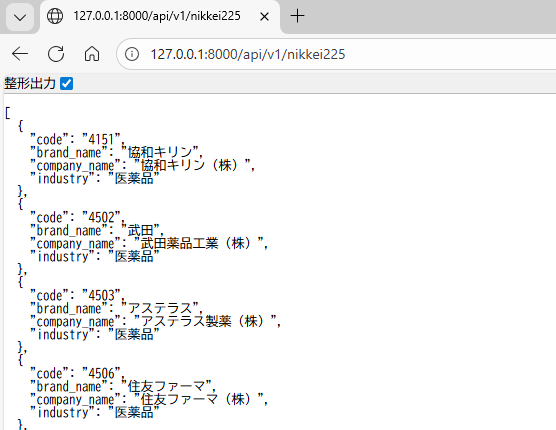
URLに127.0.0.1:8000/api/v1/nikkei225を入力すると、以下のようにJSON形式で日経225の銘柄がJSON形式で取得できるようになりました。
おわりに
今回は、実際のWebサイトから日経225の構成銘柄を取得し、FastAPIでAPIとして公開するまでの流れを実装しました。 スクレイピング特有の課題(SSL・Bot対策・HTML構造の解析)に対応しながら、実務でも応用できるAPIの土台が完成しました。
次回は、取得した銘柄の株価を取得できるようにしたいと思います。

コメント